Cloud Computer For Real Work

The persistent cloud computeryou use togetherwith AI.

Giz Computer combines desktop, terminal, drive, git, managed apps, mobile control, and site and app publishing into one persistent machine.

GizAI
Built with Giz ComputerGiz Computer itself is built, updated, and supported this way.
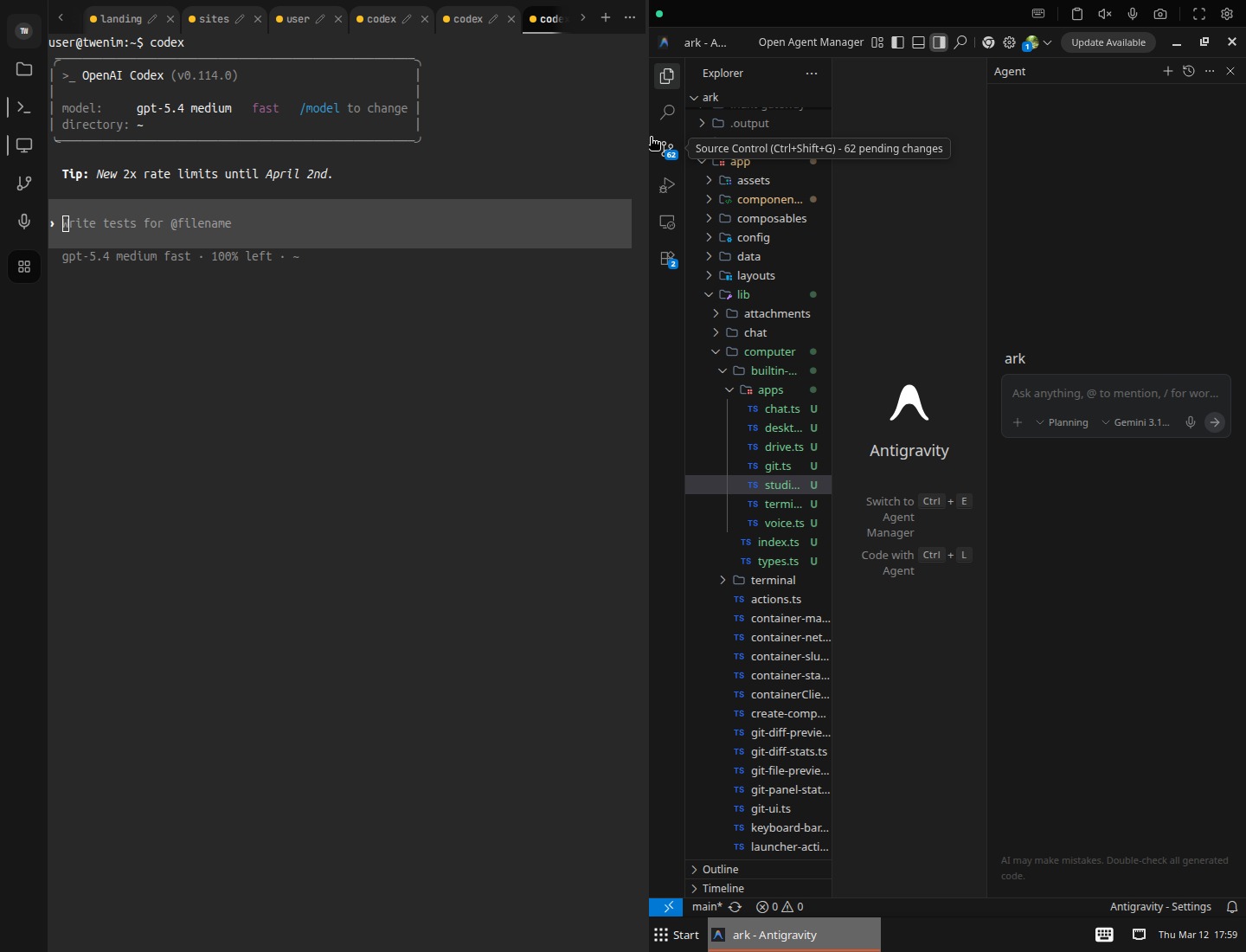
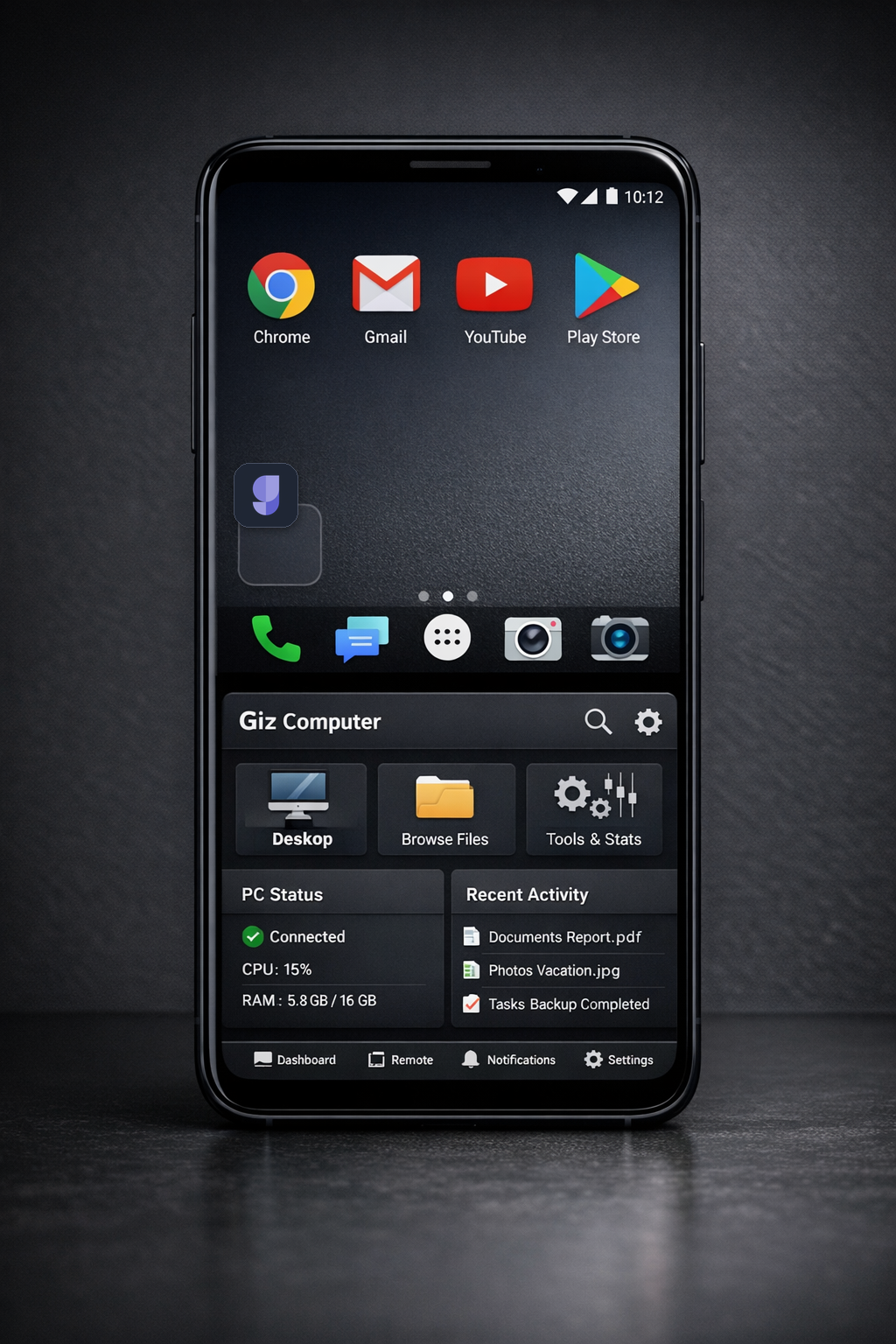
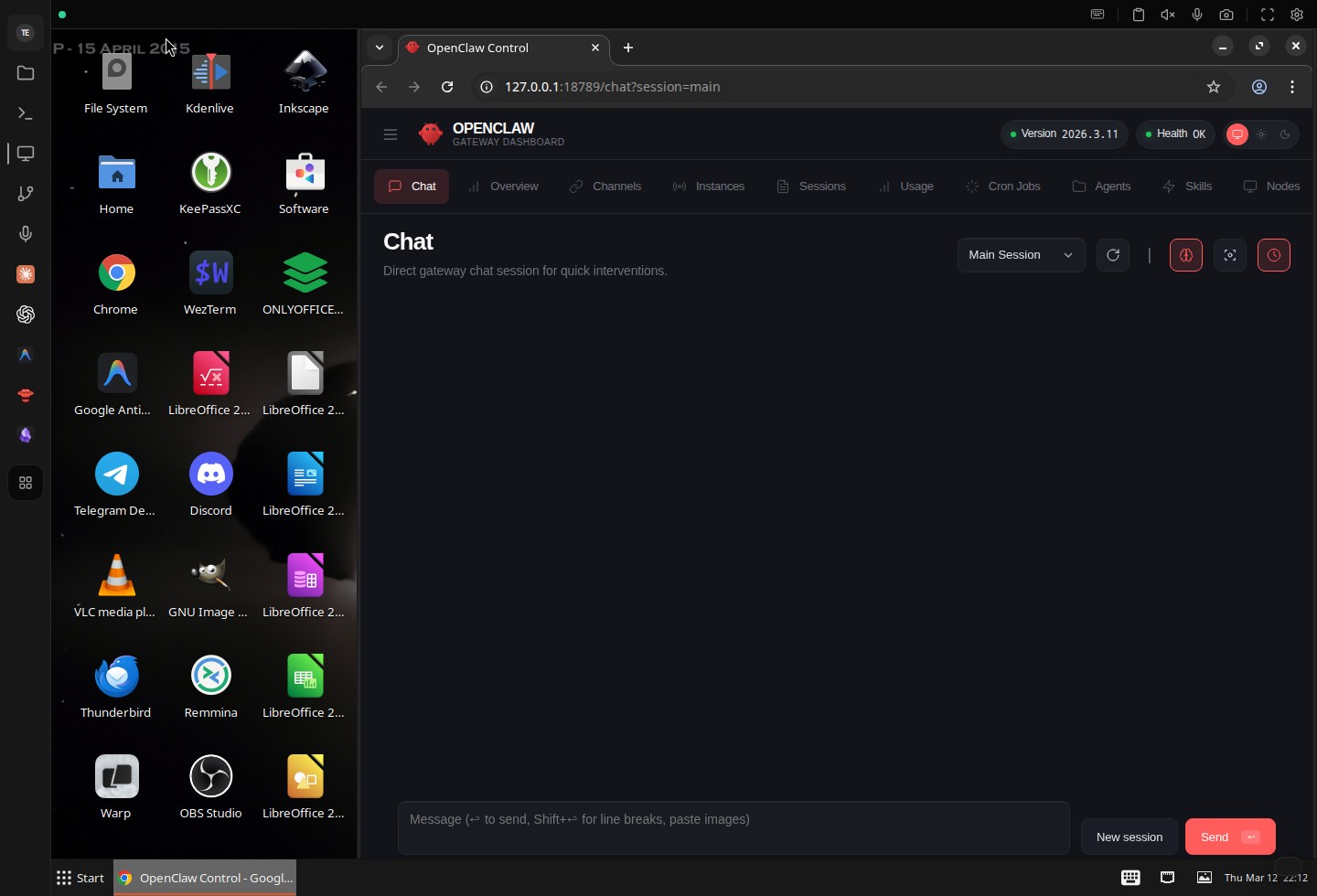
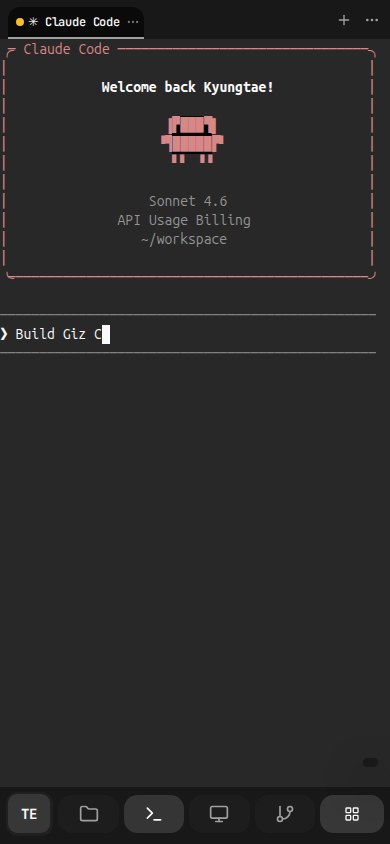
Giz Computer desktop workspaceGiz Computer mobile desktopClaude Code running in the Giz Computer mobile terminal

Nomad Work Mode

Operate from your phone, not from an office.

Giz Computer makes phone-first work practical. Issue a voice instruction, let Claude Code or Codex keep running on the same persistent machine, and open the live result from the same phone through Sites.

That is enough for product updates, customer support, and system changes while the computer keeps working in the background.
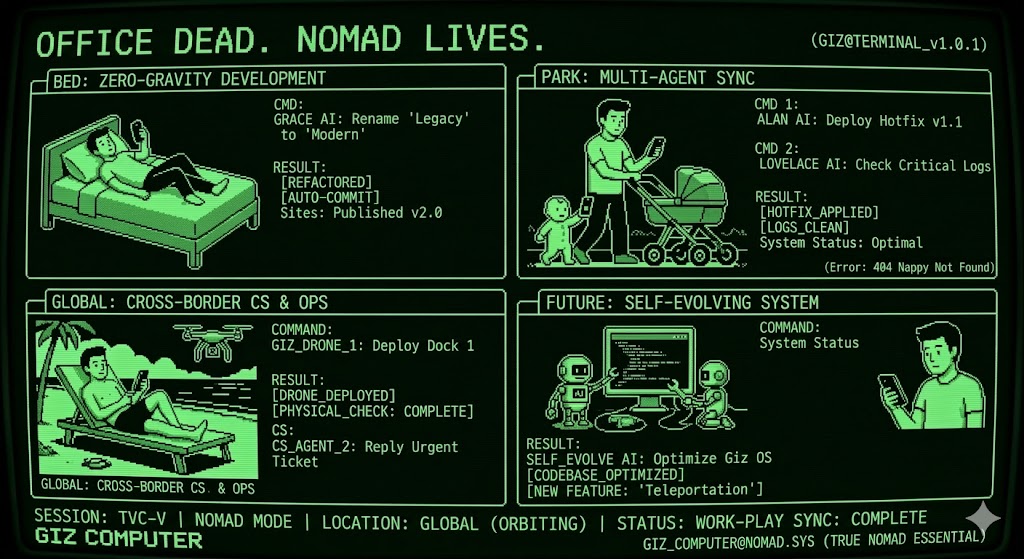
Running development, operations, and support from a phone with Giz Computer

Start from a phone

Use voice or a short prompt to hand work to Claude Code or Codex without opening a laptop.

Keep the same computer running

The task continues on the same persistent machine while you go back to family, travel, or the rest of the day.

Check the live result immediately

Open the updated site from the same phone through Sites as soon as the computer finishes the change.

Features

Real product proof, built around real use.

Computer is not just a remote desktop. It is the operating surface for machine control, Drive memory, app runtime, publishing, automation, and cross-device continuity. The landing should prove that directly.
Terminal

Terminal sessions stay ready to resume.

The terminal is not a disposable shell. Session tabs, URL-linked session state, command history, search, mobile keyboard controls, and direct shell workflows all stay attached to the same computer.

  • Persistent session tabs with direct reopen through URL state
  • Terminal search, command history, and buffered input controls built into the surface
  • Mobile keyboard bar, IME bridge, clipboard, and fullscreen-aware terminal handling
Terminal sessions stay ready to resume.

Desktop

Open a real GUI desktop, not just a code sandbox.

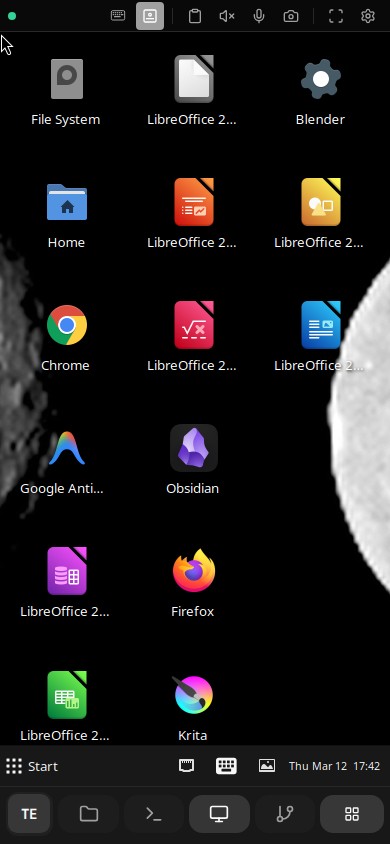
Run browser workflows, native windows, and GUI apps inside the same computer your agent and files already use, with the mobile control surface built for real remote work rather than a passive viewer.

  • Full remote desktop for GUI tools and browser tasks
  • Touchpad mode, clipboard panel, fullscreen controls, and remote resize built into the desktop toolbar
  • Remote audio, microphone, camera, and voice targeting are part of the same surface
Open a real GUI desktop, not just a code sandbox.

Split View

Keep terminal and desktop side by side.

Panel splitting is part of the workspace model. Open multiple panels at once, keep them in the same container context, and move between GUI work and shell work without tearing down either side.

  • Multiple open panels are encoded directly in the workspace URL
  • Add or remove splits without leaving the active computer
  • Desktop and terminal stay live together instead of forcing a single-surface mode
Keep terminal and desktop side by side.

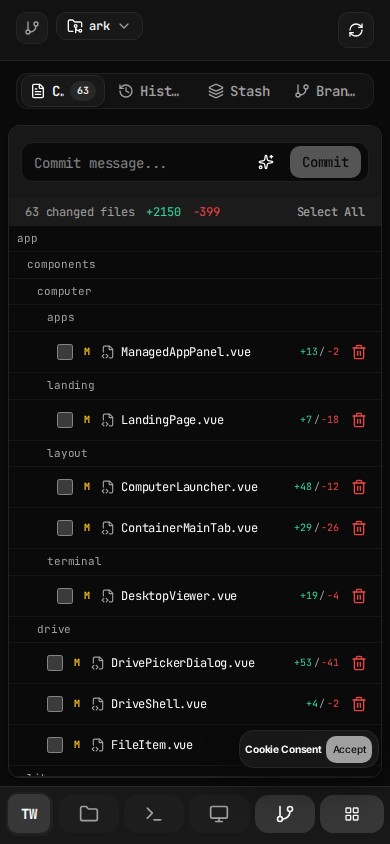
Git

Review changes in the same computer.

Git history, staged changes, and diff review live beside the terminal, files, and desktop apps that created them.

  • Diffs, staged changes, and history in the same environment
  • No context switch between coding, file edits, and review
  • Built for mixed code and asset workflows
Review changes in the same computer.

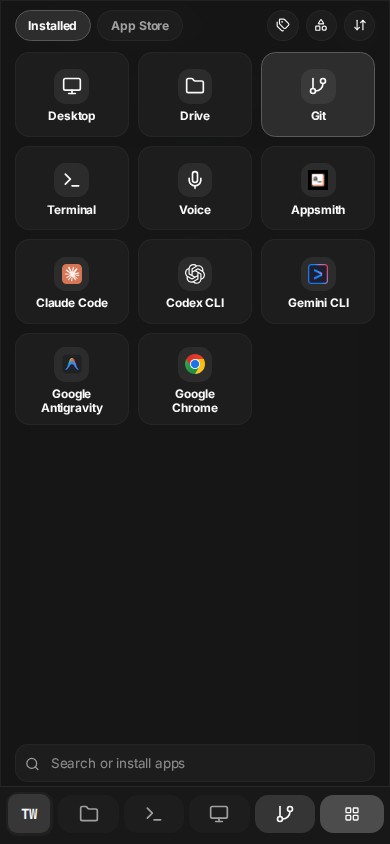
Apps

Installed tools stay one click away.

Built-in panels and installed tools stay one action away from the workspace itself, so desktop, drive, git, terminal, and voice controls can reopen without rebuilding context.

  • Launcher keeps the active tool surface close to the current computer
  • Installed tools reopen as part of the same panel model instead of a separate launcher app
  • Built-in actions and installed tools share one operating surface
Installed tools stay one click away.

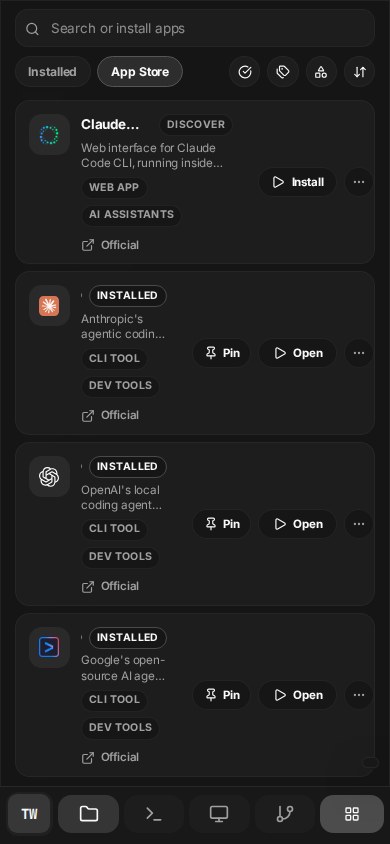
App Store

300+ apps are built into the computer.

The launcher already includes installed and App Store scopes, with search, category filters, type filters, and sort controls inside the same computer workspace.

  • Installed and App Store scopes live in one launcher
  • Search, category, type, and sort controls are already built into the catalog surface
  • The catalog is treated like a native part of the computer instead of an external marketplace
300+ apps are built into the computer.

Access

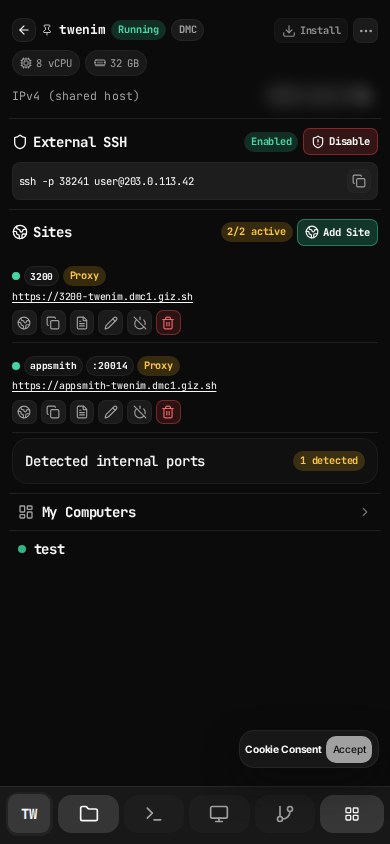
SSH, active sites, and machine switching stay together.

The main tab is not a decorative profile menu. It exposes direct SSH state, active published endpoints, per-site controls, and the running computer roster in one place.

  • External SSH enablement and machine-level access state
  • Published endpoint rows with direct operational controls
  • Machine switching from the same operating surface
SSH, active sites, and machine switching stay together.

Publish

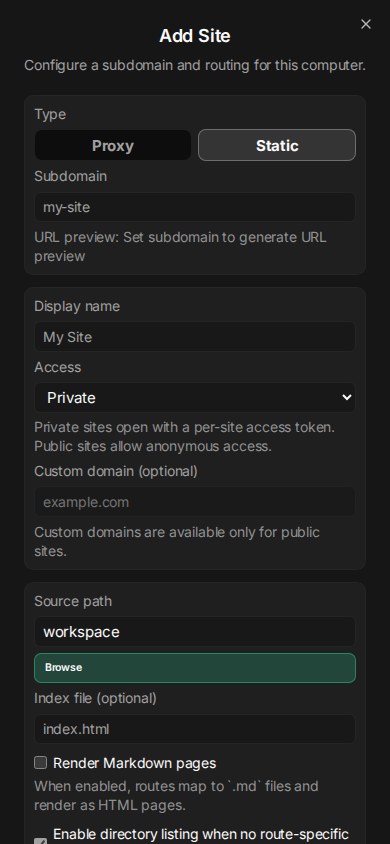
Publishing stays configurable end to end.

Proxy or static site mode, private or public visibility, URL previews, port binding, and custom domain setup are built into the product surface.

  • Proxy or static routing modes
  • Private token-gated or public access modes
  • Custom domain entry and verification in the same surface
Publishing stays configurable end to end.

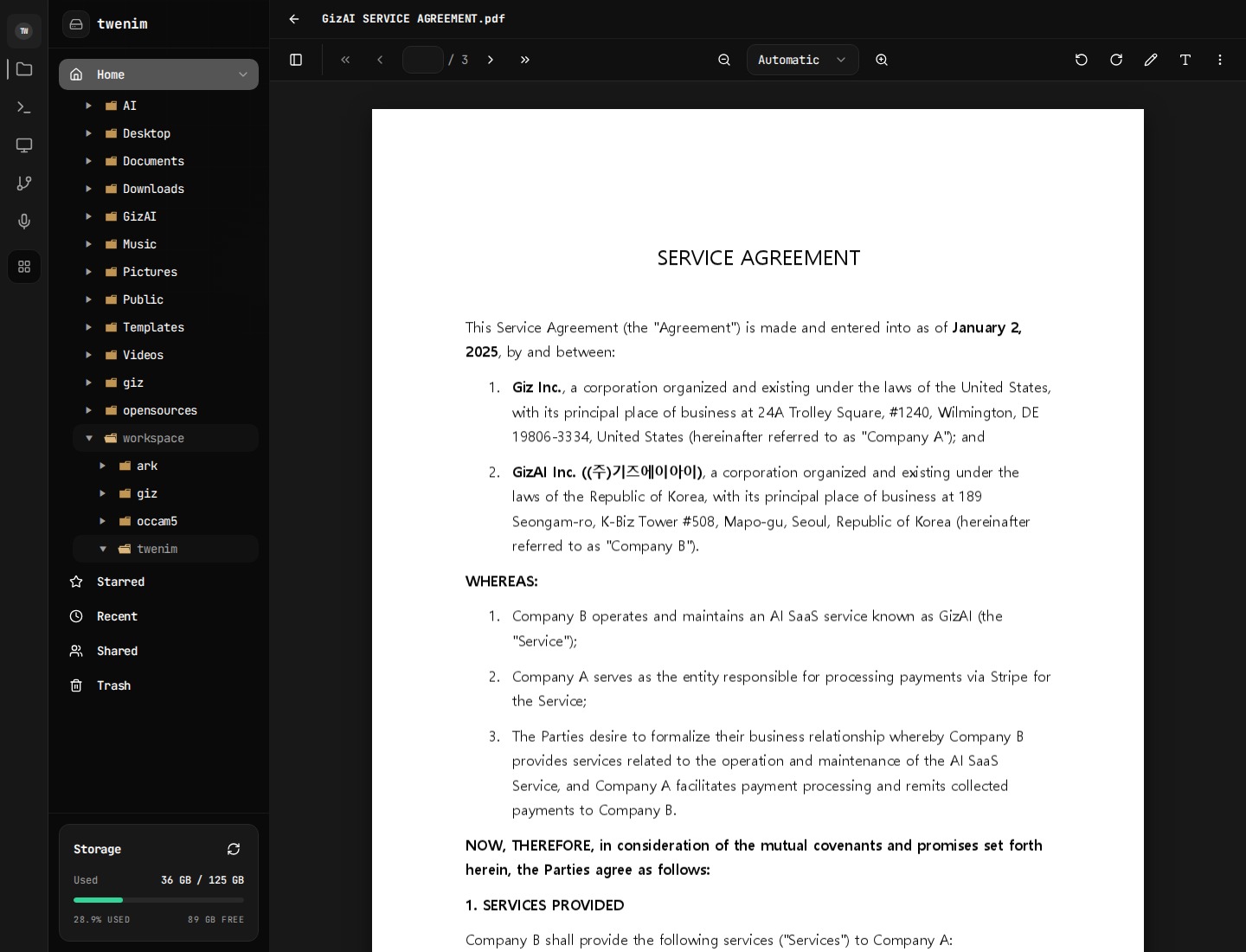
Drive

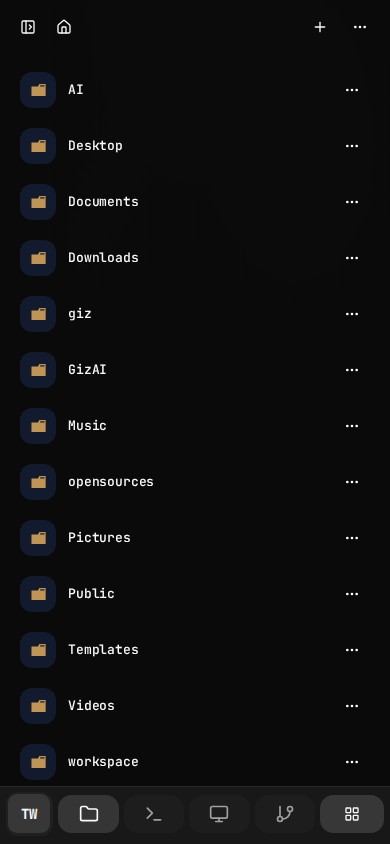
Drive stays tied to the same machine.

Folders, collection scopes, storage state, and the same container-backed file tree stay available beside Computer instead of living in a separate silo.

  • Collection scopes for home, starred, recent, shared, and trash
  • Drive remains tied to the active computer context
  • Files stay available to desktop, terminal, git, and apps
Drive stays tied to the same machine.

Snapshots

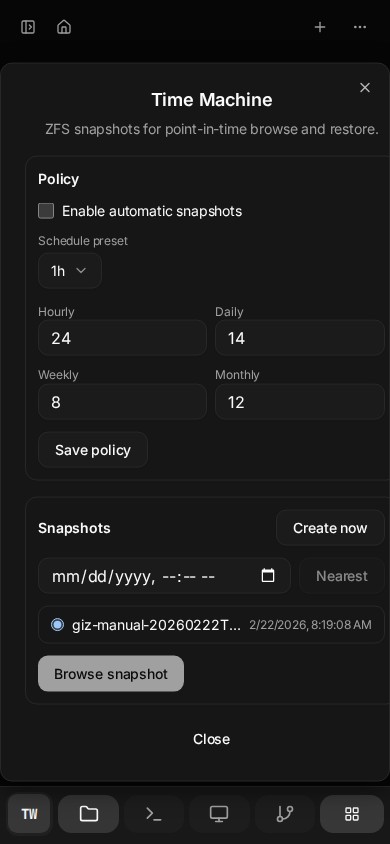
Time Machine makes Drive durable.

Snapshot policy, manual snapshots, nearest-point lookup, and restore planning are built into the product surface for the active computer.

  • Automatic retention policy across time buckets
  • Manual snapshots for the current machine state
  • Restore planning before applying recovery
Time Machine makes Drive durable.

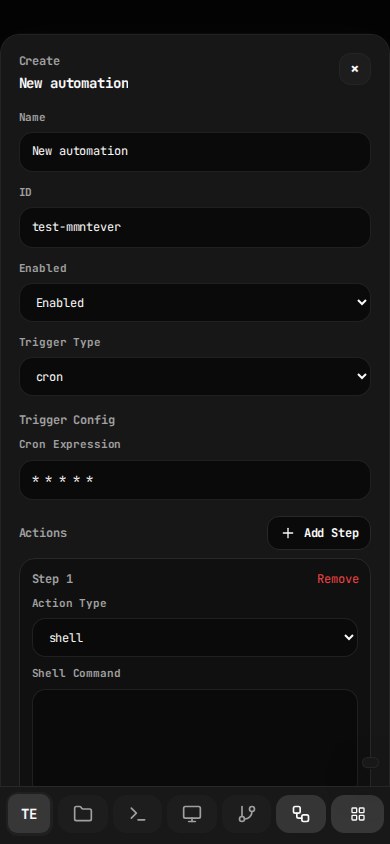
Automation

Automations stay in the same workspace.

The automation panel already exposes trigger types, config editing, install state, crontab state, run history, and log inspection directly inside the computer instead of pushing that work into a separate backend console.

  • Trigger types already modeled: cron, interval, loadavg, file, script, maildir
  • Run history, crontab state, and per-run log inspection live in the same product surface
  • Automation setup happens in the computer itself instead of separate infrastructure sidecars
Automations stay in the same workspace.

Voice + Mobile

The same machine works across desktop and mobile.

Voice is a built-in workspace capability, and the remote desktop, tool dock, keyboard controls, and mobile continuity are designed into the same product rather than split into a lite mode.

  • Voice capability is a built-in panel action in the workspace
  • Desktop controls expose keyboard, clipboard, audio, mic, camera, and fullscreen
  • Phone and desktop reopen the same running machine
The same machine works across desktop and mobile.The same machine works across desktop and mobile.

Drive Viewer

Drive opens rich viewers in place.

Viewer routing is part of the Drive architecture. PDF, media, and other file types can open in dedicated viewers with toolbar actions, zoom, preview, and file-native workflows inside the same computer.

  • Registry-based viewer selection for file-native previews
  • PDF and media flows stay inside the same Drive surface
  • Preview, inspect, and continue working without exporting files somewhere else first
Drive opens rich viewers in place.

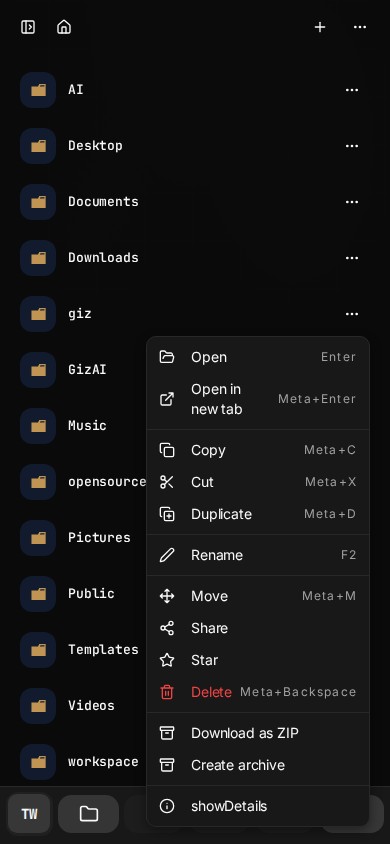
Drive Actions

Stored work stays actionable.

Drive items can be opened, moved, duplicated, archived, zipped, shared, and inspected directly from the file layer.

  • Share, move, duplicate, rename, delete, and ZIP export actions
  • Archive creation and extraction in the same shell
  • A concrete bridge between stored content and execution workflows
Stored work stays actionable.

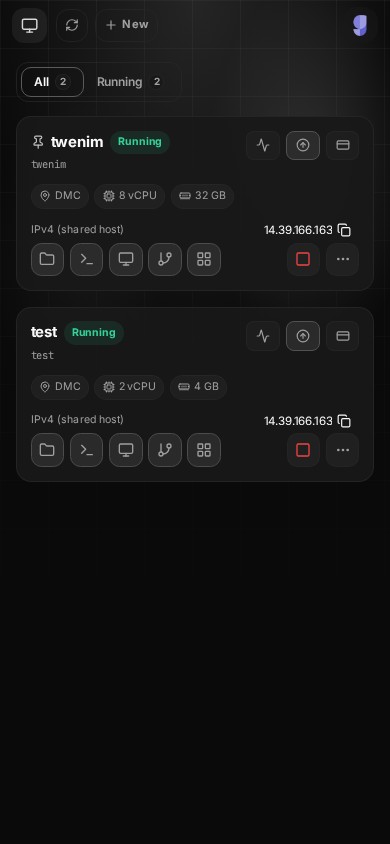
Dashboard

Manage the machine from one mobile dashboard.

Create, start, stop, upgrade, inspect network state, review billing context, and jump straight into the computer you need without leaving the same mobile surface.

  • Create and reopen multiple computers from the same mobile dashboard
  • Inspect live status, specs, billing, and runtime actions in one list
  • Open the right computer immediately instead of re-navigating the product
Manage the machine from one mobile dashboard.

Installability

Computer is built to be installable.

The product includes container-aware install UX, PWA/TWA architecture, and wake-lock support so the workspace can behave more like an app than a disposable tab.

  • Install entry lives in the main computer surface
  • Container-specific manifest and install metadata path
  • Wake-lock support for long-running foreground use
Computer is built to be installable.

Capability Coverage

This is broader than a browser IDE and deeper than a hosted desktop.

Giz Computer is the execution layer of the platform: isolated machine, persistent storage, desktop and shell surfaces, built-in App Store, mobile continuity, private-by-default publishing, and network exposure in one product.

Real Computer Surface

This is a full cloud computer surface, not a single-purpose dev environment or a browser IDE pretending to be one.

  • Full remote desktop for GUI workflows and real browser tasks
  • Low-friction terminal sessions for shell, coding, and agent-assisted execution
  • Panel-based workspace for desktop, drive, git, voice, apps, and automation

Shared State And Memory

Files, apps, agent context, metadata, and snapshot history stay aligned inside one persistent computer over time.

  • Persistent home directory across sessions
  • Drive browser tied directly to the same container storage and metadata
  • Collection scopes for recent, starred, shared, and trash
  • Snapshot-backed history and restore flows for the same container storage

Agent, Studio, And Voice

AI is optional, but when used it operates inside the same computer instead of outside it.

  • Agent panel against live computer context
  • Voice input capability available in the workspace
  • Built-in Studio and AI credit flow for media generation

Built-In App Store And Runtimes

Launch more than a terminal. The computer already includes its own App Store with managed desktop apps and service runtimes.

  • Built-in App Store with 300+ apps ready to launch
  • Managed app catalog with install and runtime controls
  • Desktop apps such as VS Code, Chrome, Firefox, Blender, LibreOffice, Krita
  • Service-style runtimes and site and app publishing from the same workspace

Document And Asset Workflows

Documents and assets are edited, transformed, and reused in place instead of being exported to another system first.

  • Note, markdown, HTML, PDF, media, and runtime viewer surfaces
  • Upload, archive, extraction, and conversion flows
  • Share and publish paths that can start from stored content

Developer Workflow Built In

Code, review, and manage changes without leaving the computer module.

  • Git panel for changes, branches, and commit context
  • Terminal for package installs, builds, scripts, and deploy flows
  • Drive and desktop for mixed code plus asset workflows

Network And Publishing

The computer is not boxed into a toy runtime. It can expose real services, SSH access, published apps, and custom domains from the same surface.

  • Public IPv6 support where available
  • Site and app publishing flows with direct HTTP routing
  • Custom-domain verification, SSH state, and routed site/app publishing

Lifecycle And Automation

Provisioning, runtime control, and safe exposure are part of the product surface, with private-by-default controls instead of silent publication.

  • Create, start, stop, recreate, delete, and upgrade computers
  • Container events, billing, and runtime actions from the dashboard
  • Automations and managed runtime controls in the same workspace

Installable Mobile Surface

Computer is designed to keep working from mobile, including install and foreground-stay behaviors.

  • PWA install path from the current computer context
  • Android TWA path and install metadata architecture
  • Wake lock support to keep the workspace foreground-friendly

Workflow View

One computer, every workflow connected.

The point is not a long list of isolated features. The point is that work can move from chat to shell, from Drive to AI agents, from desktop apps to stored files, and from the same machine to published output without leaving one environment.

Drive → AI Agents → Desktop

Files stored in Drive can be read and rewritten by Claude Code, Codex, and other agent workflows, then opened immediately from the same desktop and terminal on the same computer.

Chat → Computer → Drive

Ask, execute, and persist in one loop instead of handing work off between disconnected tools.

Studio → Drive → Computer

Generate assets, save them immediately, then refine them with scripts, desktop apps, or manual file workflows.

Computer → Site Exposure

Turn a running app or service into a reachable endpoint with exposure, routing, and domain verification.

Desktop → Mobile Continuity

Pick up the same machine from mobile when you are away from the desktop instead of falling back to a separate lite view.

Drive → Share, Publish, Or Restore

Stored work can move outward through share and publish flows or backward through snapshot restore, without leaving the same environment.

Why This Product Exists

Giz Computer gives AI a body, memory, and execution rights.

The vision for GizAI is not another chat frontend. Computer is the environment layer: a persistent machine where AI, files, apps, and user work can keep happening together over time.

CapabilityGiz ComputerCodespacesReplit
Full GUI desktopYesNoNo
Persistent machine stateYesPartialPartial
Mobile-ready control surfaceYesLimitedLimited
Built-in filesystem browserYesPartialPartial
Direct site and app publishingYesNoLimited
AI inside the same environmentYesNoNo

Pricing

Pick the computer size, keep the same product surface.

Pricing scales with machine resources, not a separate stripped-down experience.

2GB

Free
1 cores 2 GB RAM 10 GB NVMe
$0/mo

무료 2GB 컴퓨터는 시작 후 1시간이 지나면 자동으로 종료됩니다. AI 크레딧은 포함되지 않습니다.

4GB

2 cores 4 GB RAM 20 GB NVMe
$6/mo
$12/mo50% off

16GB

4 cores 16 GB RAM 75 GB NVMe
$15/mo
$30/mo50% off

32GB

8 cores 32 GB RAM 125 GB NVMe
$29/mo
$58/mo50% off

Promotional pricing may end at any time.

Start Here

Open the machine first. Decide the workflow second.

That is the real value of Giz Computer: one place where desktop apps, shell work, files, agent actions, and network publishing can all happen without context loss.